Every AI tool you have tried knows everything about the world and nothing about your work.
Ask one to write a task description and it writes something generic, because it has never seen your brand guidelines. Ask it to summarise where a project stands and it guesses, because it cannot see your board. You end up pasting context into a chat window, getting a decent answer back, then pasting that answer into the tool where the work actually lives.
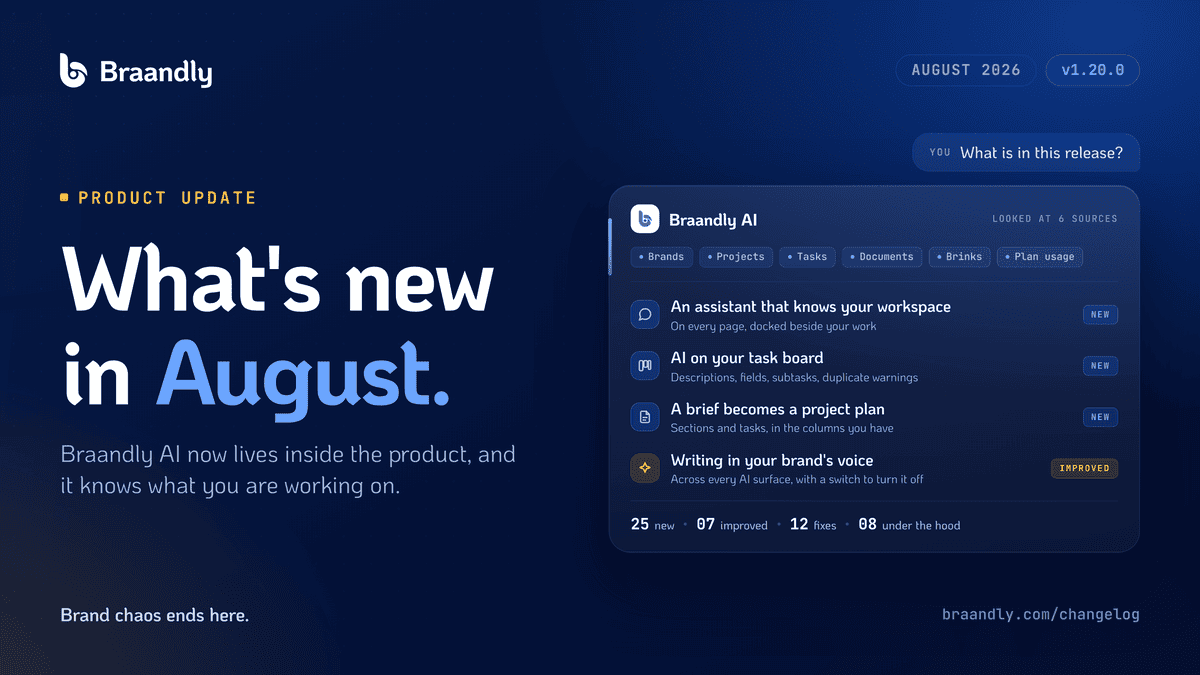
August closes that loop. Braandly AI now lives inside the product, and it already knows what you are working on.
Here is everything that shipped.
The Braandly Assistant
There is now an assistant you can open from any page in your workspace, or from the keyboard without reaching for the mouse. You ask in your own words and keep the conversation going as you move between pages.
The part worth noticing is how it sits on the screen. You can dock it as a side rail that the page makes room for rather than covers, and drag it to whatever width you want. It stays where you put it. Your board does not disappear behind a floating window while you are asking about it.
It also sees what you have open. If you are looking at a task, a document, a brand or a Brink, you can ask about “this task” instead of describing it from scratch. Whatever page you are on comes with suggested actions, so the useful thing to ask is one click away.
An Assistant That Knows Your Workspace
This is the difference between a chat window and something that is actually useful on a Tuesday afternoon.
The assistant can look up your brands, your brand guidelines, your projects, tasks, documents and Brinks, and answer from what is genuinely there. Ask how much of your plan you have used and it reads your real figures. Ask a how-to question and it answers from Braandly’s own help articles and links you to the one it used.
Every answer lists what it read to get there. You can watch it work through those sources while it is still looking, and if you would rather narrow the field, a scope control lets you decide what it may consider.
Underneath that, a few things that make it liveable day to day: suggested follow-up questions under the last answer, a prompt library where you save the prompts you keep retyping and pin the ones you use most, and the ability to edit a message you already sent and resend it, or regenerate an answer you were not happy with.
One deliberate choice: when the assistant proposes subtasks, they arrive as a card you review and accept. It does not write to your board on your behalf.
AI on Your Task Board
Four things landed here, and each one removes a small piece of friction that adds up over a week.
Generate a task description from the task’s own context, and read it before it goes anywhere near the task. Get a suggested priority, tags, assignees and due date, drawn from what the task actually says rather than from a template. Break a task into subtasks, built around the subtasks it already has so nothing gets duplicated.
And a duplicate warning: if you start writing a task that reads like one already on the board, Braandly says so and links you to the one you probably meant. Small feature. Saves the conversation where two people discover they have been working the same ticket.
A Brief Becomes a Project Plan
Paste a brief into the board and you get back sections with the tasks inside them.
The important detail is that it reuses the columns your board already has instead of inventing new ones. Nobody wants a plan that arrives with its own parallel structure and leaves you reconciling two systems.
Empty boards now also offer a gallery of templates, or an AI-generated plan, instead of leaving you staring at a blank page.
Project Status Summaries
Write a status summary from what is actually on the board. Counted, not guessed.
Previous summaries are kept as history, so you can see how a project moved between updates. Any summary can be saved as a document, which is usually where it needs to end up anyway.
Writing in Your Brand’s Voice
Your workspace brand voice now shapes every AI surface in Braandly: the assistant, brands, guidelines, documents and tasks. There is a switch to turn it off when you want plain output.
In documents, a brand voice finding now applies to the exact passage it points at, rather than making you find the sentence yourself.
The Board and Documents Got Better Too
Not everything this month was AI.
Board columns can now be folded down to a rail so you can focus on the rest of the board, and you can drop tasks straight onto a folded column. The board statistics bar starts collapsed, so the header is calmer on arrival.
Document search now looks through document bodies, not just titles, and it stays fast as your document count grows.
Credits You Can See Before You Spend Them
Costs are shown before you spend them, read from the account that actually pays, so what you are quoted matches what is deducted.
If you run out mid-conversation, the assistant pauses its lookups rather than ending the conversation, so you can keep talking. Generated content that gets cut short is now reported instead of quietly returned as though it were complete, and you are not charged for it. Starting credits are granted on every path that creates an account, and a stranded balance repairs itself.
Waiting states across every AI surface now say what is happening instead of showing an unexplained spinner.
Fixes, and One Correction Worth Naming
Twelve fixes shipped this month. The assistant ones are the ones you would have felt: messages appearing twice, replies coming back blank, the first message of a new chat going missing, an answer being blanked out just as it finished. Stopping generation mid-answer now keeps the part it had already written. An unsent draft survives a page reload.
Elsewhere: a document editor crash, dialogs clipped by the layout around them, tooltips that ignored keyboard focus, the docked rail overlapping the sidebar, board columns that read as stuck loading, and partly applied plans that reported success when they had not fully succeeded.
The correction worth naming honestly: several claims in our pricing and contact FAQs did not match how billing actually works. Those are fixed. Five previously published help articles that contradicted the product were corrected, twelve drafts were published, and seven new articles were written covering Brink subscriber limits and exports, the contrast checker, downloading a brand kit, saved collections, publishing one guideline per brand, and requesting a refund.
On security, we hardened sign-in, password setting, account recovery and team invitations, and following a link into Braandly now returns you only to genuine Braandly pages. AI requests are paced per account, so heavy use by one person cannot slow the service for everyone.
At a Glance
| Area | What changed |
|---|---|
| Braandly Assistant | Opens from any page or the keyboard, docks as a resizable side rail, sees what you have open |
| Workspace knowledge | Answers from your brands, guidelines, projects, tasks, documents, Brinks and plan usage |
| Transparency | Every answer lists what it read, with a scope control to narrow it |
| Task board AI | Descriptions, suggested fields, subtask breakdowns, duplicate warnings |
| Project plans | A brief becomes sections and tasks, reusing your existing columns |
| Status summaries | Counted from the board, kept as history, saveable as a document |
| Brand voice | Applies across every AI surface, with a switch to turn it off |
| Board | Template gallery, collapsible columns, calmer header |
| Documents | Full-text search, brand voice findings applied to the exact passage |
| Credits | Costs shown upfront, no charge for cut-off generations, reliable starting balance |
| Totals | 25 new features, 7 improvements, 12 fixes, 8 under the hood |
What’s Next
The assistant can read your workspace. The obvious next question is what it should be allowed to do in it, and how much you want to approve first. That is the line we are working out now.
Full changelog: braandly.com/changelog
Brand chaos ends here.