Every AI tool you have ever opened starts the same way. Blank box, blinking cursor, and the quiet expectation that you will explain your own work to it first. What the project is. Who it is for. How your brand sounds. Every time, from scratch, before it will write you a single sentence.
Meanwhile, two tabs away, Braandly already knew all of it. Your board. Your documents. The brand voice you set up on day one and have not thought about since.
Today we are connecting those two things.
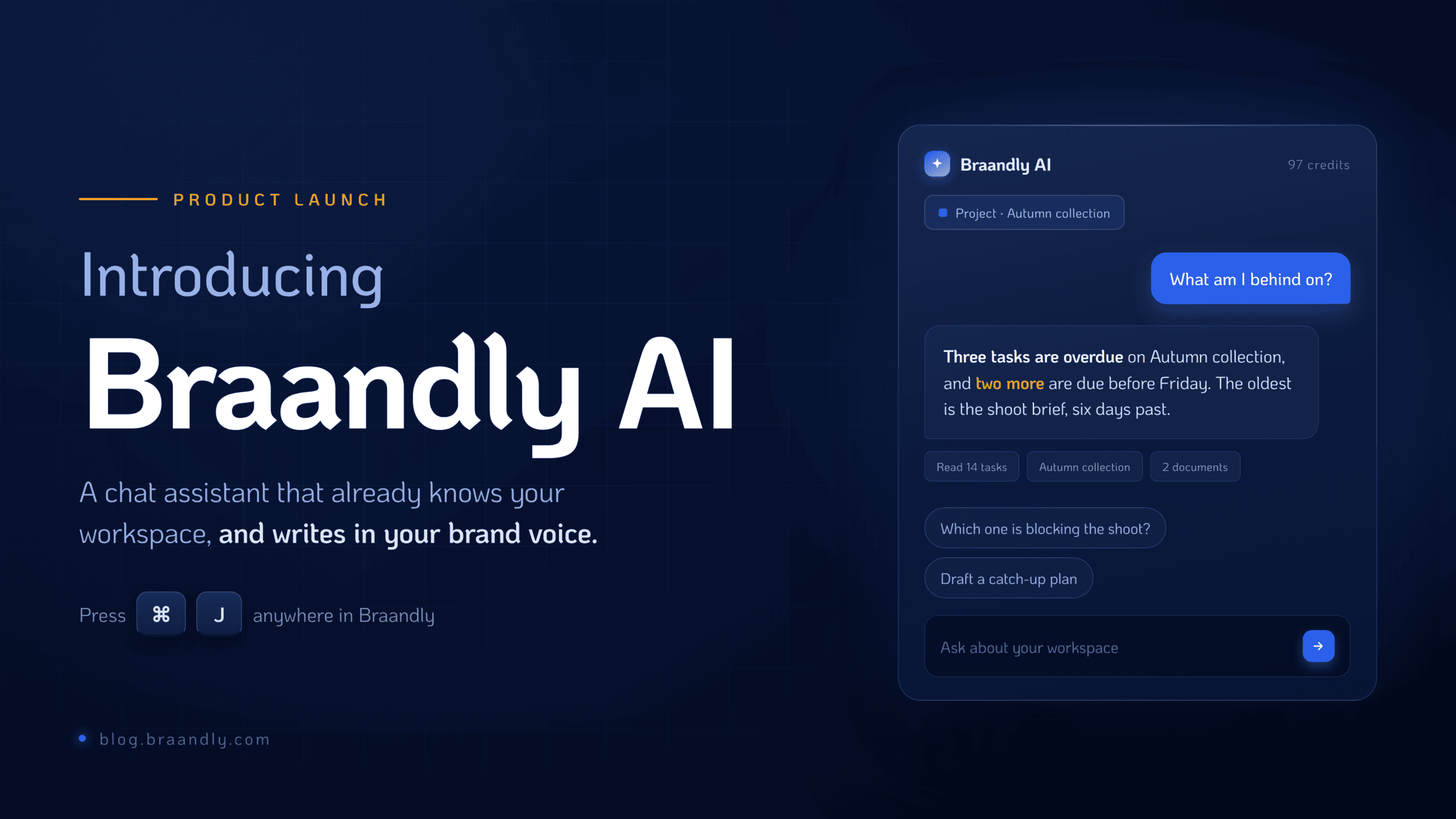
Braandly AI is a chat assistant that lives inside your workspace. Press Cmd+J and it opens beside your work. It can see what you have open, it can look up the rest for itself, and everything it writes runs on your brand voice rather than a neutral one.
Here is everything in this release.
The assistant
Braandly AI lives in a side rail you can dock, resize, and move. The page reflows around it instead of hiding behind it, so you can keep working with it open. Cmd+J opens it from anywhere in the app.

It knows what you have open. On a task, it knows which task. In a document, it knows which document. A context chip shows you exactly what it can see, so there is never a guess about what it is reasoning over.
Behind that, it can look things up for itself: your tasks, projects, documents, brands, guidelines, Brinks, and a workspace overview. Ask what is overdue on a project and it goes and counts rather than inventing a number. Every lookup shows its sources, so you can check the answer against the thing it read. A scope picker narrows what it may touch, for when you would rather keep it on a short leash.
It can also answer questions about your own account. How many credits are left, what your workspace limits are, what you are close to.
Three smaller things that make it usable day to day:
Saved prompts. The ones you keep retyping now live in a library, personal or shared with the workspace, pinned for one-click use. A starter set ships with it.
Proposals you accept. When the assistant drafts subtasks, it does not write them. It proposes them, and you tick the ones you want. Nothing lands in your workspace on the model’s say-so.
Follow-ups. After each answer, a row of suggested next questions, drawn from what you just asked.

Your brand voice, in every generation
This is the part that is hardest to see and matters most.
Braandly has stored your brand voice, your identity, your do’s and don’ts since the day you set them up. None of it reached the AI. Every generation ran on a generic prompt, which is exactly why the output read generic.
Your brand context is now injected into every generation, across documents, tasks, brands, and Brinks. The tagline generator that used to write in a neutral voice writes in yours. A toggle turns it off when you want something deliberately off-brand.
In documents it goes further. Run a brand voice check and you no longer get a score and a paragraph of advice. You get findings anchored to the exact passage that triggered them, each with a rewrite you can apply in one click. It reads like a linter, because that is what it now is.
Tasks that fill themselves in
Descriptions. Ask for one and you get a draft to review before it is applied, never after.
Field suggestions. Priority, tags, assignees, and a due date, proposed from the task’s content. Fields you have already filled in are skipped rather than overwritten.
Breakdown into subtasks. From the task’s own text, deduplicated against the subtasks you already have. The dedupe is most of the value.
Duplicate warnings. Start writing a task that reads like one already on the board and you hear about it before you create the second one.
A brief becomes a board
Describe what you are trying to do and Braandly AI lays out the board sections and writes the tasks inside them. If the board already has columns, it uses them rather than inventing parallel ones.
Ask where a project stands and you get a status summary built from actual task counts, not the model’s impression of the board. Summaries are kept, so this week can be compared against last. Keep one as a document, or delete it.
The board itself
Not everything in this release was AI.
Columns fold down to a rail, so a six-column board stops being a horizontal scroll. An empty board now offers you something rather than nothing: pick a template from the gallery, or hand it a brief and let the AI plan it. The stats bar collapses by default and stays out of the way until you want it.
And across every AI surface, the wait tells you what is happening. Not a spinner. The step the model is actually on.
At a glance
| Feature | What it does |
|---|---|
| Braandly AI chat assistant | Dockable, resizable side rail, opened with Cmd+J, aware of the task or document you have open |
| Workspace lookups | Reads tasks, projects, documents, brands, guidelines, Brinks, with sources shown |
| Scope picker | Narrows what the assistant is allowed to touch |
| Prompt library | Personal or shared saved prompts, pinnable, with a starter set |
| Brand voice injection | Your brand context in every generation, across documents, tasks, brands and Brinks |
| Brand voice linter | Findings anchored to the exact passage, each with a one-click rewrite |
| Task intelligence | Descriptions, field suggestions, subtask breakdown with dedupe, duplicate warnings |
| Project planning | A one-line brief becomes board sections and tasks |
| Status summaries | Built from counted tasks, saved for comparison, keepable as a document |
| Board improvements | Collapsible columns, template gallery on empty boards, collapsed stats bar |
| Progress states | The actual step the model is on, instead of a spinner |
What it costs
Braandly AI runs on credits.
| Action | Credits |
|---|---|
| Message to the assistant | 3 |
| Task description | 5 |
| Document rewrite | 8 |
| Project status summary | 12 |
| Full project plan from a brief | 20 |
Every Starter account comes with 100 free credits, enough to try all of the above without spending anything.
Worth saying plainly, because it catches people out: creating a brand by hand is free and always has been. Credits are spent only when you ask the AI to generate something for you.
Why This Matters
The reason most AI features feel disposable is that they have no memory of your work. They are strangers you brief from zero every morning, and strangers write like strangers.
Braandly has been collecting the context that fixes that since the day you set up your first brand. Your voice, your rules, your board, your documents. Braandly AI is not us adding intelligence to the product. It is us finally handing the intelligence the file it should have been reading all along.
Open it with Cmd+J and ask it what you are behind on.